
Everything Buyers Need in One Platform
Find The Right Maritime Partner
Browse verified maritime companies, explore service categories, and create RFQs to receive competitive offers for your supply and service needs.
Browse 7000+ maritime companies
Explore 1000+ maritime categories
Create RFQs for Supply & Services
Choose how to start
Choose the path that best fits your current task.
Browse Catalog
Best when you want to explore and compare maritime companies before making contact.
Browse by category, business type or location
Review Business Profiles, verification and reviews
Create RFQs for Supply & Services
Contact companies directly
Request Multiple Offers
Best when you need multiple offers for Supply or Services and want to compare them in one place.
Create one structured request
Matching companies submit offers
Compare submitted offers
Account required
Keep your maritime sourcing in one place
Create a free account to save companies, create RFQs and compare submitted offers in one workspace.
Free to join
Your buyer workspace
All in one placeSave companies
Create RFQs
Compare offers
Finding maritime companies and managing sourcing is fragmented.
Instead of switching between emails, spreadsheets and separate company sources, buyers can browse companies, review trust signals, create RFQs and compare submitted offers in one place.
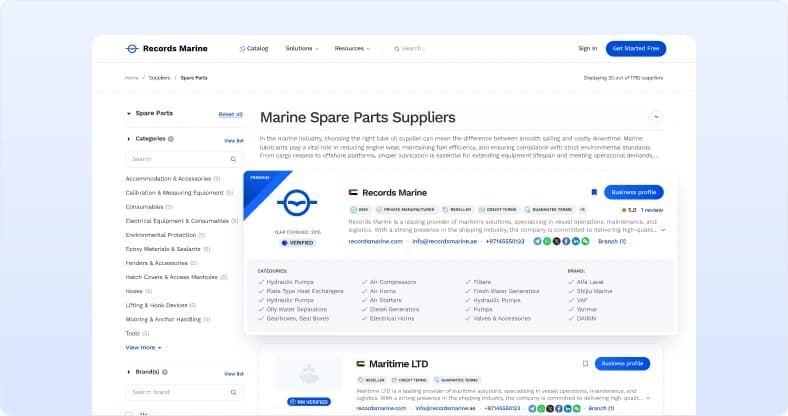
Maritime Company Directory
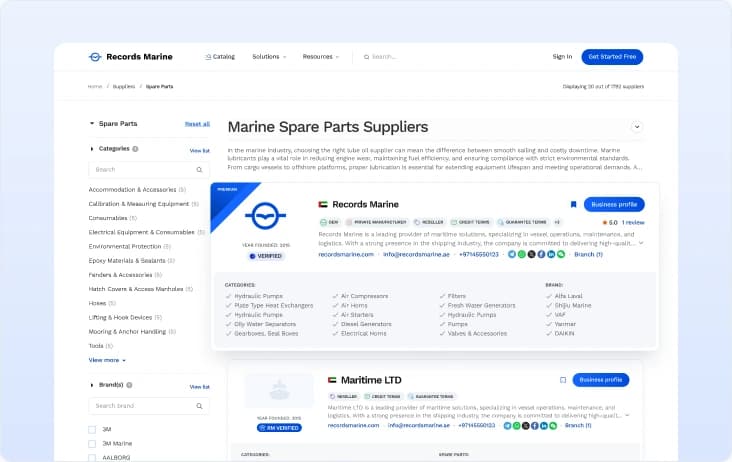
Browse companies by business type, category, country, port and capabilities.
Detailed Business Profiles
Review company information, locations, categories, brands, verification status and contact details.
RFQs for Supply & Services
Create structured requests — matching companies can review the published RFQ and submit offers.
Offer summaries
Review key commercial terms, included items, exclusions and additional charges.
My Records
Save companies and keep useful sourcing records organized for future needs.
Reviews
Help buyers make informed decisions by exploring reviews and sharing their own experience.
Create one RFQ.
Compare submitted offers clearly.
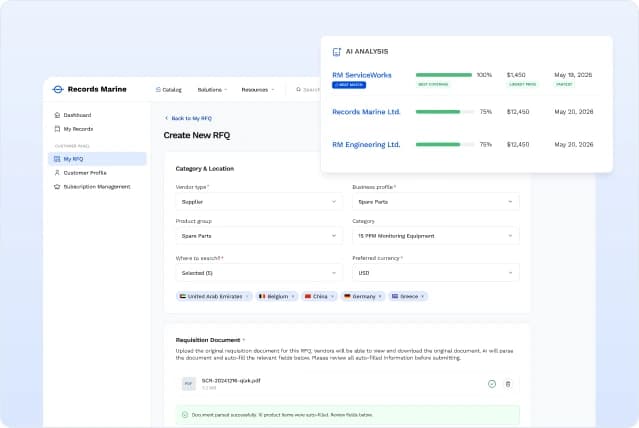
Available after registration. RFQs cover Supply and Service categories.
1
Upload your requisition
Upload your requisition. AI will analyze the document, extract key details, and recommend the most appropriate business category.
2
Review and submit
Review the AI-generated RFQ, edit it if needed, and submit it. Once submitted, the RFQ will be sent to all relevant vendors.
3
Compare offers
When vendors respond, AI analyzes and compares their offers, highlighting key differences in pricing, specifications, delivery terms, commercial conditions, and other important details.
4
Select a vendor
Choose the best offer, accept it, and continue the conversation directly with the vendor.
Use verification badges before you contact a company
Records Marine helps buyers identify companies with confirmed business information, additional verification, or reviews. Verification badges help you assess company information but do not replace your own commercial and technical due diligence.
Verified Company Information
The company's registration and legal information have been confirmed against official registries.
Comprehensive Business Verification
The company's registration, legal information, business operations, products, services, and capabilities have been verified through a comprehensive review of supporting documentation and information confirmed by an RM representative
Previous Customer Experience
Explore feedback from previous customers before making a decision.
Frequently asked questions
Everything you need to know about browsing maritime companies, creating RFQs and using buyer features.
Yes. Buyers can create a free account, browse companies and use the currently available buyer features at no cost.
Yes. You can browse the catalog and view public profiles without creating an account. A free account is required to save companies, create RFQs and manage submitted offers.
An RFQ, or Request for Quotation, is a structured request that describes your supply or service needs and allows matching companies to submit offers.
After submission, your RFQ is reviewed and made available to matching Suppliers or Service Providers. You can track responses, compare submitted offers and select the most suitable vendor.
Yes. You can upload a requisition document when creating an RFQ. Records Marine analyses the document, extracts key details and suggests a relevant business category for you to review before submission.
The Verified badge means that the company’s registration and core legal information have been checked. RM Verified indicates a more comprehensive review of the company’s business information and supporting documents. Verification helps you assess company information but does not replace your own commercial and technical due diligence.
Yes. Submitted offers are summarised in one place so you can compare indicative price, coverage, included and excluded items, delivery details and commercial terms before selecting a vendor.
Yes. You can use the available contact details on a company’s public Business Profile to contact it directly. Records Marine provides the platform, while buyers and vendors communicate and contract directly.
No. Creating and submitting RFQs is available to registered buyers free of charge.
You can browse Suppliers, Service Providers, Shipyards and Port Agents. RFQs are currently supported for supply and service requirements, while Shipyards and Port Agents can be contacted directly through their Business Profiles.
Start with
Records Marine
Browse maritime companies or create a free account to manage RFQs, offers and saved records.
Free account & browsing
Verification & reviews
Sourcing in one place